Do You Really Need a Cloud Desktop?

Choosing between modern devices, Windows 365 and Azure Virtual Desktop starts with understanding how your users work.
No, not every organization or user needs a cloud desktop. The right workplace can be a modern managed device, Windows 365 or Azure Virtual Desktop, depending on how users work, which applications they rely on, their security and compliance requirements, connectivity, cost and the way IT is managed. Organizations supporting hybrid teams, external users or distributed workforces often start by comparing technologies such as Azure Virtual Desktop and Windows 365. But choosing the technology first risks solving the wrong problem.
A successful workplace strategy starts with a different question: “What kind of workplace do your users actually need?” For some users, a well-managed laptop is the simplest and most cost-effective answer. Others may benefit from the persistent Cloud PC experience of Windows 365. Azure Virtual Desktop can be particularly relevant where organizations need greater centralization, controlled external access or support for legacy applications.
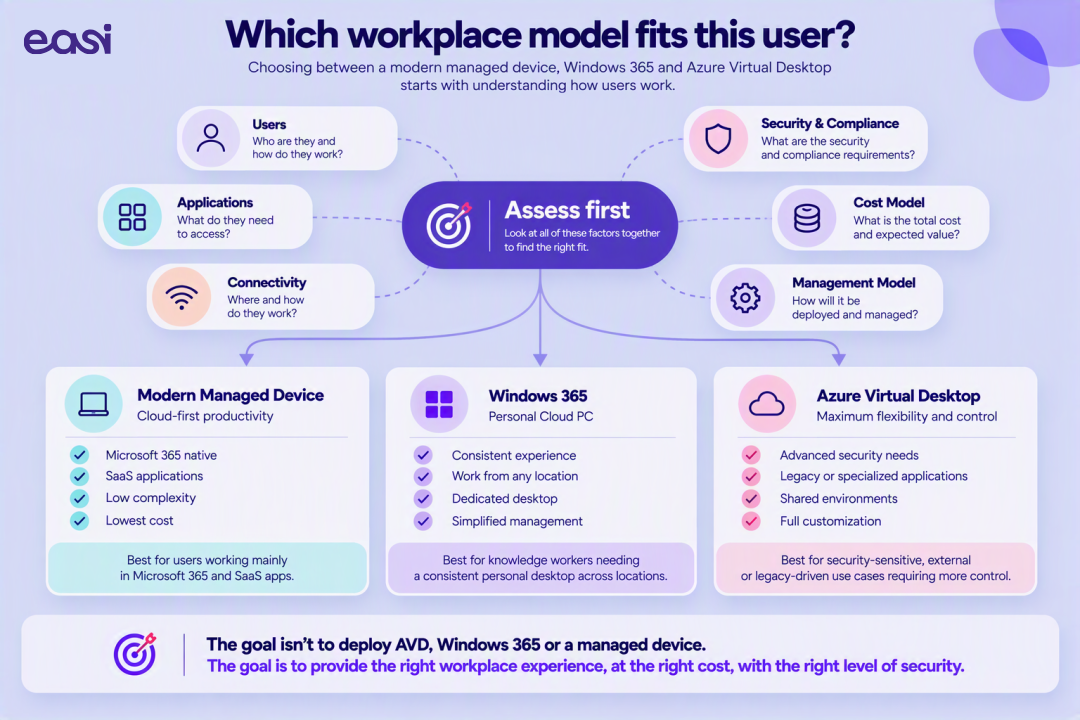
The goal is therefore not to deploy a cloud desktop. It is to provide the right workplace experience, at the right cost, with the right level of security.
Executive summary
1. Why cloud desktop projects miss the mark
Cloud desktop projects often miss the mark because the technology decision is made before the user, application, security and operational requirements are fully understood.
Virtual desktop technology is mature. The difficult part is often not deploying it, but deciding where it adds value, which users need it and how the environment will be operated afterwards.
Several recurring mistakes can turn a technically correct implementation into a workplace that is unnecessarily expensive, difficult to manage or frustrating for users.
Azure Virtual Desktop is extremely flexible, which can also make it tempting to use it everywhere.
But an employee spending most of the day in Microsoft 365 and browser-based SaaS applications may not need a virtual desktop at all. A modern, properly managed laptop could provide a simpler experience at a lower operational cost.
Another user working with sensitive corporate information from an unmanaged external device may have completely different requirements.
A workplace strategy built around one standard user profile rarely reflects reality.
Consider the difference between:
- A finance employee working with business-critical applications
- A consultant regularly working from customer locations
- A developer requiring substantial computing resources
- A temporary contractor using their own device
- A back-office employee working mainly from one office
All of them need access to company resources, but they do not necessarily need access to them in the same way.
Understanding these user personas is one of the most important steps in workplace design.
Questions such as these appear frequently at the beginning of workplace projects:
Should we move to Azure Virtual Desktop? Would Windows 365 be easier? Could AVD replace our current environment?
They are reasonable questions, but simply not the first ones we would ask.
Once that is understood, the technology conversation becomes considerably easier.
A cloud desktop can be perfectly configured and still provide a poor workplace experience.
Connectivity, latency, application behaviour, peripherals, video conferencing and the physical location of users all influence what the employee experiences every day.
Those factors are particularly important for organizations with multiple offices, international locations or employees working from environments where network quality cannot always be guaranteed.
A virtual desktop environment does not stop requiring attention once users have logged in successfully.
Someone still needs to think about:
- Images
- Application updates
- Security policies
- Capacity
- Performance
- Scaling
- User profiles
- Cost optimization
- Monitoring
- Support
The operational model therefore belongs in the design discussion from the beginning. Otherwise, organizations risk creating a technically impressive environment that becomes unnecessarily complex to operate.
2. Start with a Cloud Desktop Readiness Assessment
Before choosing Azure Virtual Desktop, Windows 365 or a modern managed device, assess six areas: user profiles, applications, security and compliance, connectivity, cost and the management model.
At Easi, these areas form the basis of our Cloud Desktop Readiness Assessment. The objective is not to validate a predetermined technology choice, but to understand which workplace model fits the organization and its different user groups.
A Cloud Desktop Readiness Assessment examines six areas: user profiles, applications, security and compliance, connectivity, cost and management. Together, they determine whether a modern managed device, Windows 365, Azure Virtual Desktop or a combination of models is the best fit.
The first question is simple:
We look at where and how different user groups work:
- Office-based employees
- Hybrid workers
- Fully remote employees
- External users
- Contractors
- Temporary employees
- Users working across different locations
These groups may ultimately require different workplace models within the same organization. And that is perfectly normal.
The applications users depend on often determine what is technically realistic.
We therefore look at the complete application landscape, including:
- Microsoft 365
- SaaS applications
- Browser-based platforms
- Legacy applications
- Business-specific software
- Applications with specific performance requirements
- GPU-intensive workloads
This also helps identify dependencies that might not be obvious when looking only at infrastructure.
Workplace flexibility should not come at the expense of data protection.
The assessment therefore examines questions such as:
- Where may corporate data reside?
- Which users require access from unmanaged devices?
- Are external users involved?
- What compliance requirements apply?
- Which data should remain inside the corporate environment?
- How should access be controlled and monitored?
For some organizations, these considerations become one of the strongest arguments for a cloud desktop. While for others, existing endpoint security and management may already provide everything required.
A cloud desktop depends on connectivity.
That sounds obvious, but its impact is sometimes underestimated during workplace design.
We assess factors such as:
- Internet quality
- Office connectivity
- Remote working conditions
- Geographic distribution
- Application performance requirements
- Dependencies on local devices or peripherals
The goal is to understand whether the proposed workplace model will work where employees actually work, and not only inside an architecture diagram.
Comparing workplace options purely on licensing cost rarely tells the full story.
The broader model can include:
- Device lifecycle costs
- Windows 365 subscriptions
- Azure consumption
- AVD infrastructure
- Support
- Management
- Security
- Operational effort
- Refresh cycles
A cloud desktop may reduce costs in one area while introducing them elsewhere, so the objective is not necessarily to identify the cheapest model, but to understand the total cost of delivering the required workplace experience.
Finally, we look at how the workplace will be operated:
- Is IT centrally managed?
- Do local teams have responsibilities?
- Is management partly outsourced?
- Are there different models across business units or countries?
The workplace technology should support that operating model rather than fight against it.
3. What comes out of the assessment?
A Cloud Desktop Readiness Assessment should result in a clear workplace recommendation, risk analysis, roadmap, priorities and budget indication. The goal is not another technical report that disappears into a SharePoint folder. It should provide enough evidence to make a workplace decision.
Depending on the organization, the outcome can include:
- A workplace readiness assessment
- A risk analysis
- A recommended workplace model
- A roadmap
- Budget indications
- Priorities and dependencies
- Identification of user groups that may require different solutions
And importantly, that recommendation does not automatically have to be Azure Virtual Desktop.
4. Who actually needs Azure Virtual Desktop?
Azure Virtual Desktop is most relevant when users or applications require greater centralization, controlled access or a virtualized environment. Other users may be better served by Windows 365 or a modern managed device.
In practice, one organization can use several workplace models at the same time.
As a general decision framework, a modern managed device often fits users working primarily with Microsoft 365 and SaaS applications; Windows 365 can fit users who need a persistent personal Cloud PC across locations; and Azure Virtual Desktop can fit security-sensitive, external-user, legacy-application or centrally controlled scenarios. These are starting points, not fixed rules, hence the importance of the word "can" in our examples. The final choice should follow the assessment.
Imagine employees who mainly work with:
- Microsoft 365
- Teams
- Browser-based applications
- SaaS platforms
- A modern corporate laptop
For these users, a well-managed endpoint may already provide everything they need. Adding a virtual desktop could simply introduce another layer between the user and their applications.
Other users may value having a persistent workplace that is available regardless of the physical device they are using.
They typically need:
- A consistent Windows experience
- Straightforward access from different locations
- Predictable performance
- A personal desktop environment
For those users, Windows 365 can be an attractive model, as it provides a dedicated Cloud PC and a relatively straightforward operational approach.
Now consider contractors, external employees or users working from unmanaged devices.
The priority may no longer be the endpoint itself, but rather controlling where corporate applications and data can be accessed.
In these scenarios, Azure Virtual Desktop can provide greater centralization and control while still enabling remote access.
Some organizations still rely on applications that were never designed for a modern distributed workplace.
They may require:
- Specific configurations
- Centralized application delivery
- Controlled dependencies
- Shared environments
- Particular computing resources
Virtualization can sometimes be the most practical way to make these applications available without reproducing complex configurations on every endpoint.
Here too, Azure Virtual Desktop can become part of the solution.
5. Why are organizations reconsidering their workplace model?
Hybrid work, BYOD, external users, growing security requirements and mergers and acquisitions are making traditional one-device, one-location workplace models less practical for many organizations.
These trends do not automatically mean organizations need virtual desktops, but they increasingly require IT teams to reconsider how applications and data are securely delivered.
Employees increasingly expect to access corporate resources from different devices and locations.
That flexibility creates an obvious question for IT:
In some scenarios, keeping applications and data inside a controlled environment can significantly simplify that discussion.
Organizations regularly need to provide temporary or external users with access to internal systems.
Providing and managing physical devices is not always practical.
At the same time, granting broad access from unmanaged endpoints can introduce unnecessary risk.
A virtual workplace can offer another way to separate access from the physical device.
Traditional workplace security often focused heavily on securing the endpoint.
Modern workplace strategies increasingly need to consider something broader:
That can influence whether workloads should remain local, move to a Cloud PC or be delivered through a more controlled virtual environment.
Workplace architecture can also become important during organizational change.
After an acquisition, IT teams may need to give new colleagues access to corporate resources before devices, networks, identities and applications have been fully consolidated.
A virtual workplace can sometimes provide a faster transitional model while the broader integration continues.
Perhaps the most obvious change is also the most fundamental one.
The workplace is no longer one place.
Employees can move between the office, home, customer locations and other environments during the same week.
That makes consistency increasingly important.
But consistency does not necessarily mean giving everyone the same technology.
It means designing a workplace experience that remains appropriate wherever and however that person works.
6. What about Citrix versus Azure Virtual Desktop?
There is no universally better choice between Citrix and Azure Virtual Desktop: the right platform depends on the existing environment, workforce, applications and operating model. Historically, platforms such as Citrix have played an important role in delivering applications and virtual workspaces.
Today, organizations have additional options available, including Azure Virtual Desktop and Windows 365, but that does not make the decision a simple matter of replacing one platform with another.
The useful question is not "Which platform is best?"; but "Which platform best fits your workforce, applications and operating model?"
For some organizations, that may mean evolving an existing virtual desktop strategy. For others, it may mean simplifying it. And for some user groups, it may mean moving away from virtualization altogether.
7. How we approach workplace strategy
Our workplace assessment follows three steps: understand the current workplace, assess the technical and business requirements, and translate those findings into a practical workplace strategy roadmap.
That means discovery first, assessment second and recommendation third; before implementation decisions are made.
Meeting 1 — Workplace Discovery Session
We start with the people behind the technology.
Together, we map:
- User profiles
- Existing workplace models
- Applications
- Locations
- Current challenges
- Business expectations
Output: Current Workplace Overview
This gives us a shared picture of the environment we are actually trying to improve.
Meeting 2 — Cloud Desktop Assessment Workshop
Once the current workplace is understood, we go deeper into the requirements that can influence the architecture.
That includes:
- Technical dependencies
- Application requirements
- Security
- Compliance
- Connectivity
- Performance
- Management
- Cost
Output: Cloud Desktop Readiness Report
At this point, the potential workplace models become much clearer.
Meeting 3 — Workplace Strategy Roadmap
The final step turns those findings into a practical recommendation.
The roadmap can define:
- Which workplace model fits which users
- Recommended priorities
- Dependencies
- Migration steps
- Budget indications
- Implementation phases
Output: Workplace Strategy Roadmap
Only after these decisions have been made do we start talking seriously about implementation.
8. From assessment to implementation
When Azure Virtual Desktop is the right choice, implementation should be treated as one stage in a broader lifecycle rather than as the end goal.
The readiness assessment determines what should be implemented; professional services turn that design into an operational environment; and managed services support the environment afterwards. Deployment is an important moment, but it is not the entire journey.
Conclusion: sometimes the best AVD project is the one we advise not to implement
So, do you really need a cloud desktop? Not necessarily. There is a temptation in technology to start with the solution.
We prefer starting with the requirement:
- Sometimes that analysis leads directly to Azure Virtual Desktop.
- Sometimes Windows 365 is the simpler option.
- Sometimes different user groups need different models.
- And sometimes a modern laptop remains exactly the right workplace.
That is not a failed cloud desktop project, but a successful workplace decision.
The goal is not to deploy Azure Virtual Desktop. The goal is to give users the right workplace experience, at the right cost, with the right level of security.
Ready to understand which workplace model fits your organization?
Our Cloud Desktop Readiness Assessment helps organizations evaluate user profiles, applications, security and compliance requirements, connectivity, cost and management needs before selecting a workplace strategy.
Before you deploy, migrate or invest, make sure you are choosing the right workplace model.
Talk to our experts



- Microsoft
- Cloud
- Azure